
PERMUTATIONA Function
An Excel Statistical function that returns the number of repeated permutations from a set number of objects.


What is the PERMUTATIONA Function?
The PERMUTATIONA function is an Excel Statistical function that returns the number of repeated permutations from a set number of objects. A PERMUTATIONA is a mathematical formula to arrange any set or subset of objects in a particular order.
The order of the specific set of objects is significant when using the PERMUTATIONA Function. Additionally, it is a Worksheet Function (WS) classified under Excel’s Statistical functions.
Another permutation is used to calculate objects without repetition. This is called the Permut function. The difference between these two functions is the use of repetition. Many Excel functions are similar to Permutation.
Excel functions similar to PERMUTATIONA:
- COMBINA(): Returns the number of different possible combinations for a given number of items, allowing repetition
- COMBIN(): Returns the number of different possible combinations for a given number of items
- PERMUT(): Returns permutations from two sets of a given number of objects without repetition
A Permutation means that the order of a group does matter.
- The PERMUTATIONA function in Excel is a mathematical function used to calculate the number of permutations of a set of objects, including the repetition of items.
- The PERMUTATIONA function returns a numeric value representing the number of permutations of number_chosen items from a set of number items, where order matters and repetition of items is allowed.
- The PERMUTATIONA function is commonly used in combinatorics, probability, and statistics to calculate the number of possible arrangements or permutations of items.
- If either number or number_chosen is not an integer, the PERMUTATIONA function will round it down to the nearest integer. If either argument is negative, the function returns a #NUM! error.
How to use the PERMUTATIONA Function in Excel?
When using the PERMUTATIONA Function, we can understand its objective first. The purpose of the function is to find the number of specified combinations that can be returned from an ordered object set, with an allowance for repetition.

The syntax of the PERMUTATIONA Function in Excel is represented by:
PERMUTATIONA(number, number_chosen)
Let's dissect this into small segments to understand it better:
- PERMUTATIONA(): This is the function you will need to type into your cell on the sheet to begin the process of calculating your return.
- Number: The required argument must be greater than or equal to zero and a numeric value. It represents the number of objects.
- Number_chosen: The required argument represents the object classification in the function. The constraints of this argument are that its total is greater than 0 and is a numeric value.
Note
For this function, the (number,_) argument can be smaller than the (_,number_chosen) argument, unlike the Combin Functions.
PERMUTATIONA Function Examples
The PERMUTATIONAL function can be understood through the following examples.
Example 1
In this first example, we can select two sets of specified objects.
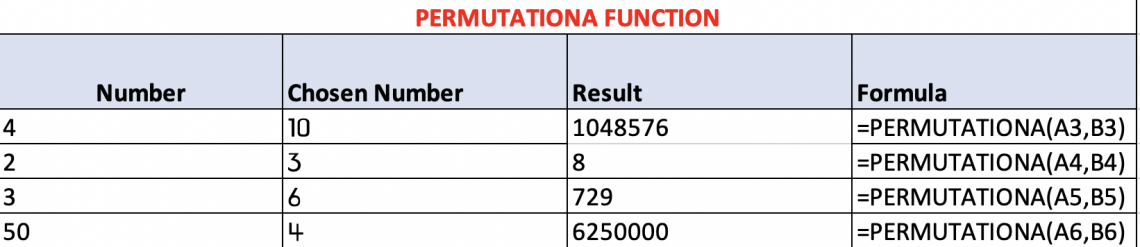
1. Our (number) in this scenario is the number represented by the Number column on the left.
- 4
- 2
- 3
- 50
2. Our (number_chosen) in this scenario is represented by the second column from the left, “Chosen Number.”
- 10
- 3
- 6
- 4
3. Our Result is what the function returns, which means how many possible group combinations each class has.
- List 1 has a possibility of 1048576 variations.
- List 2 has a possibility of 8 variations.
- List 3 has a possibility of 729 variations.
- List 4 has a possibility of 625,000 variations.
4. To find our outcome, we implemented each number in the correct arguments for our formula.
Example 2
In this second example, we can select two sets of specified objects the same way as the first, except I want to show you the possible outcomes.
There are 4 objects in the group, (1,2,3). PERMUTATIONA returns 16 variations; the numbers can be arranged with repetition:
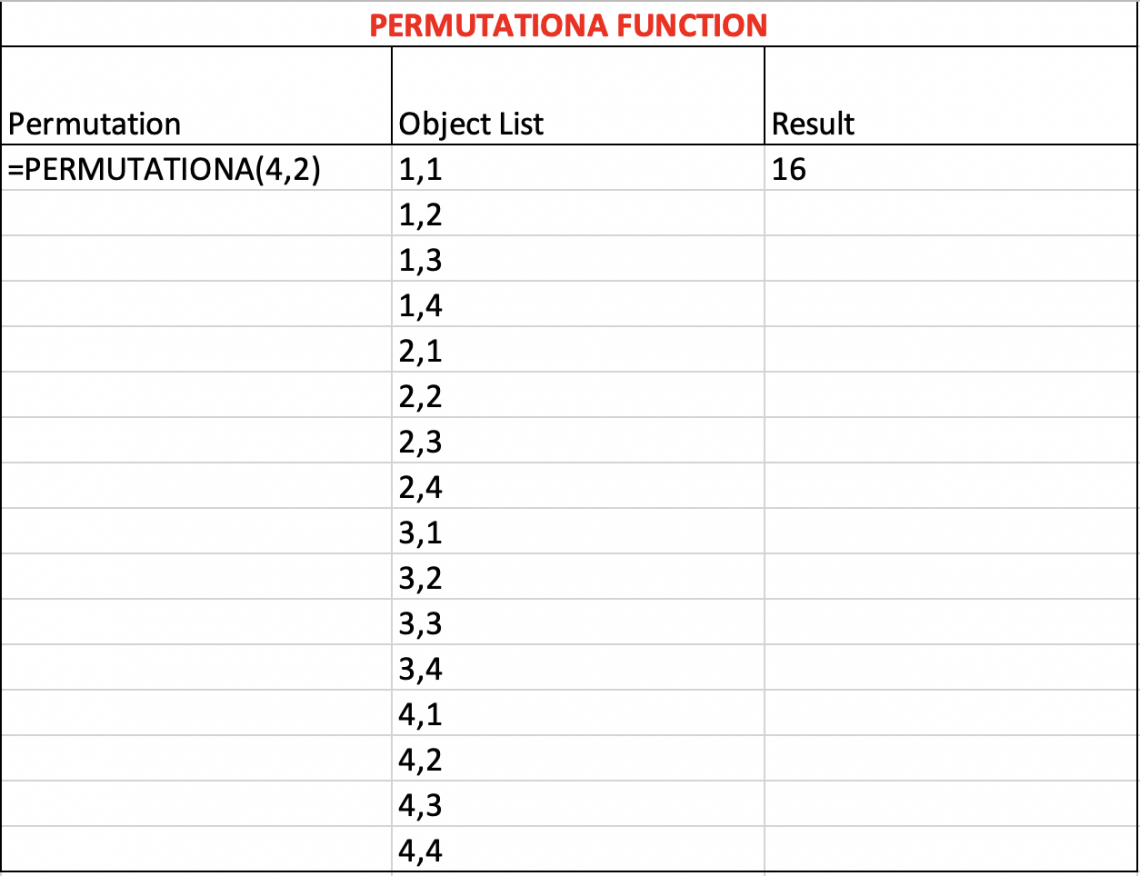
1. Our (number) in this scenario is the first parameter in the argument.
- 4
2. Our (number_chosen) in this scenario is the second parameter in the argument
- 2
3. Our Result is what the function returns:
- 16 different ways that 4 objects can be arranged into two groups with repetition.
4. To find our outcome, we implemented each number in the correct arguments for our formula.
The math behind the PERMUTATIONA Function
Understanding how to calculate Excel functions can be helpful in mastering how to know when, and where to use specific functions.

The PERMUTATIONA formula allows for repetition, which is why we do not have to use the Factorial function represented by the symbol “!”. This differs from the Permut function, which does not allow for repetition and explains why the factorial function is necessary for Permut.
The mathematical formula for the PERMUTATIONA Function is
Permutationa = TotalChosen
We can apply for our numbers from Example 2 to this formula:
- Total = 4
- Chosen = 2
- 42 = 16
We also can apply some of our numbers from Example 1 to this formula:
- Total = 4
- Chosen = 10
- 410 = 1048576
- Total = 2
- Chose 3
- 23 = 8
By calculating the permutation using the formula, we can still get the same that Excel gave us, with just a little more work. This highlights why excel is so important; utilizing its resources can save you time.
Note
A simpler way to look at this formula is by taking the (number,_) parameter to the power of the (_,number_chosen).
Common Errors using the PERMUTATIONA Function
When using Excel functions, it's common to get repeated errors on worksheet functions. Most errors can be easily avoided if you know what causes them. Excel errors are helpful in communicating to the user that there's a restriction in the function.
To help avoid this, this is a list of some of the most common errors when using the PERMUTATIONA Function:
1. #VALUE! Error
It occurs when a user enters a non-numerical value in a function that only accepts numeric values. For example, if the text was to be entered in the (number,_) or (_, number_chosen) argument, the #VALUE! Error would be returned.
The #VALUE! error occurs with any worksheet function that only accepts numbers.

2. #NUM Error
The #NUM error is an error that is returned when a number is out of the constraint., Permutationa has restrictions for each argument. Specifically, the error will occur if:
- (Number,_) < 0
- (_, number_chosen) < 0 OR (_, number_chosen) > (Number,_)
The #NUM error can be made with any function that has inequality restrictions such as (<,>, or =).

Error Examples:
- =PERMUTATIONA(-1,10) = #NUM!
- =PERMUTATIONA(-8,6) = #NUM!
- =PERMUTATIONA(4,-12) = #NUM!
- =PERMUTATIONA(“TEXT”,6) = #VALUE!
- =PERMUTATIONA(2,”TEXT”) = #VALUE!
- =PERMUTATIONA(“TEXT”,”TEXT”) = #VALUE!

Free Resources
To continue learning and advancing your career, check out these additional helpful WSO resources:


or Want to Sign up with your social account?