


A model of mine has this issue where unless I have formulas on full / automatic (I like to keep them on partial / automatic except data tables), I get these weird lines on cells unless I save the file. See below screenshot. What's weird is that these aren't even data tables, just normal sum formulas, so the data does change, the lines just don't go away.
This issue is specific to this one file; all others are normal. Anyone know how to fix?
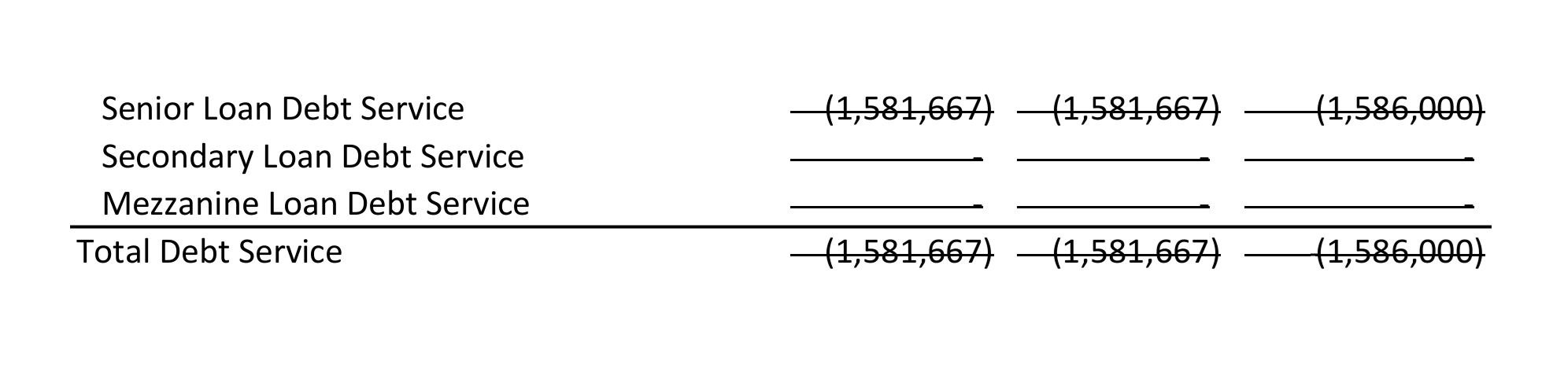






File > Options > Formula > Scroll down to “Error checking rules” > Uncheck “Cells containing stale value”
I think this was added and/or was turned on as default in an Office update in the last year
Accusamus id ut ullam nobis aut non culpa. Possimus dignissimos voluptate molestiae illum. Quaerat vero pariatur voluptatem optio.
Perspiciatis perspiciatis ex iste distinctio natus asperiores. Dolorem in ex tempore sint. Non autem voluptas quas et vel. Rerum enim sunt qui velit asperiores sit. Maxime sit suscipit doloribus non. Voluptatibus modi et voluptas consequuntur. Voluptates laboriosam et at perferendis.
See All Comments - 100% Free
WSO depends on everyone being able to pitch in when they know something. Unlock with your email and get bonus: 6 financial modeling lessons free ($199 value)
or Unlock with your social account...