
Dream Excel Update


Full Disclosure: Most of my work/background is in c++ or python, so please excuse any typos in the hypothetical excel equations.
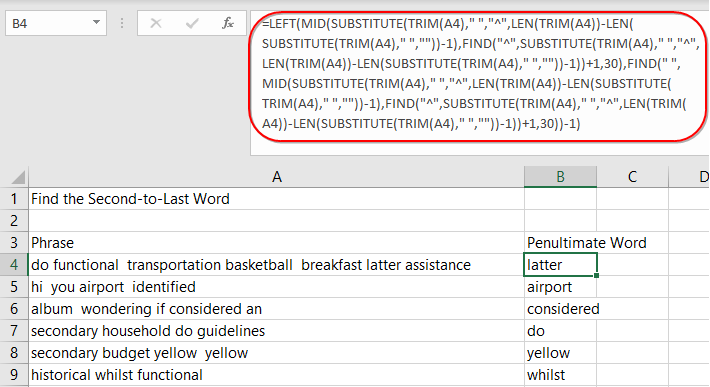
Oftentimes on anything remotely advanced, the formulas used in a cell of excel can get very long and cumbersome to read, even if you wrote it yourself. The colored "()" help some, but there is a much better way of making longer equations more readable. Just use multiple lines and indentions like any programming language has been doing for decades.
For those of you not familiar with programming, you can think of a program as the longest excel equation imaginable. Programmers keep things organized by keeping logical steps, and more importantly sub-steps broken up on new lines and indented to clearly show differences and hierarchies. It takes a little getting used to, but once you pass that point, even the most complicated, multi step, multi hierarchies make perfect sense at a glance.
Excel could keep everything as is, but add a tiny button on the far right hand side of the equation bar, that when pressed shows the equation below automatically broken out with logical spaces and indentations. It would be easy to toggle it back to normal, and once you are done with the cell, either way that stuff goes off of the screen.
I'm pretty sure algorithyms to automatically indent and spread a program/equation out over multiple lines logically already exist, especially for things as simple as advanced/long excel equations.
So, my question is, why hasn't excel already done something like this? (note: I realize that you can already alt-enter to space the equation out, but that takes time and doesn't indent or do it all automatically)
Some hypothetical examples:
=left(
mid(
substitute(
trim((A4)," ", "^",
len(trim(a4) ....
.....
......
=if(C7>1100,100,
if(C8>12,100,
else(C9>15,150,0)
)
)
| Attachment | Size |
|---|---|
| long excel equation 25.49 KB | 25.49 KB |







If you have a long formula, you’re doing it wrong
That's probably true for the most part with things like pivot tables etc, but there are often exceptions and plenty of their userbase isn't adept at using those tools.
Hopefully they’ll add stories to the next Office update
Have you heard of alt + enter ? It can create a line indent in the forumla bar of Excel. Although not perfect, it does remedy the excel formula lengthn and allows for easier readability.
I also agree with the sentiment that Excel is best used as bursts of small, non-complex formulas across a workbook or formulas broken up into multiple formulas. The fact is, Excel's limitations are imminent in statistical analysis or text analysis. That's just not what excel was initially designed to do and despite the integrations and add-ons, it will look clunky.
My Dream Excel update would be to simplfy the find text features and to also have "Left Align across Selection" + "Right Align across Selection". There are some very small grievances of mine regarding the formatting notions in specific. One core notion is how you can have boarders above or below cells that differ from boarders in adjacent cells and there's no easy way to tell which cell contains the boarder formatting. Think about that one for a section.
Nihil doloribus at dolorum optio qui. Vel optio reprehenderit culpa perspiciatis. Harum est magnam exercitationem quos et non. Esse excepturi delectus beatae enim quis eos et. Iure molestiae blanditiis at id aut dolor expedita. Laboriosam sit est consequuntur ea.
See All Comments - 100% Free
WSO depends on everyone being able to pitch in when they know something. Unlock with your email and get bonus: 6 financial modeling lessons free ($199 value)
or Unlock with your social account...