
Excel shortcuts


I spent 5 years in M&A, did lots of Excel. Naturally, I learnt all the shortcuts that made me more productive. However, when I migrated to Mac none of those shortcuts worked, so I went back to using a mouse.
Recently, I changed my keyboard to one that allows you to program different layers. Basically, you press a special "super" button and the whole layout of keys changes to whatever you want. In my case it changes from "qwerty" to "Excel" layer.
Here is one of the possible layouts:
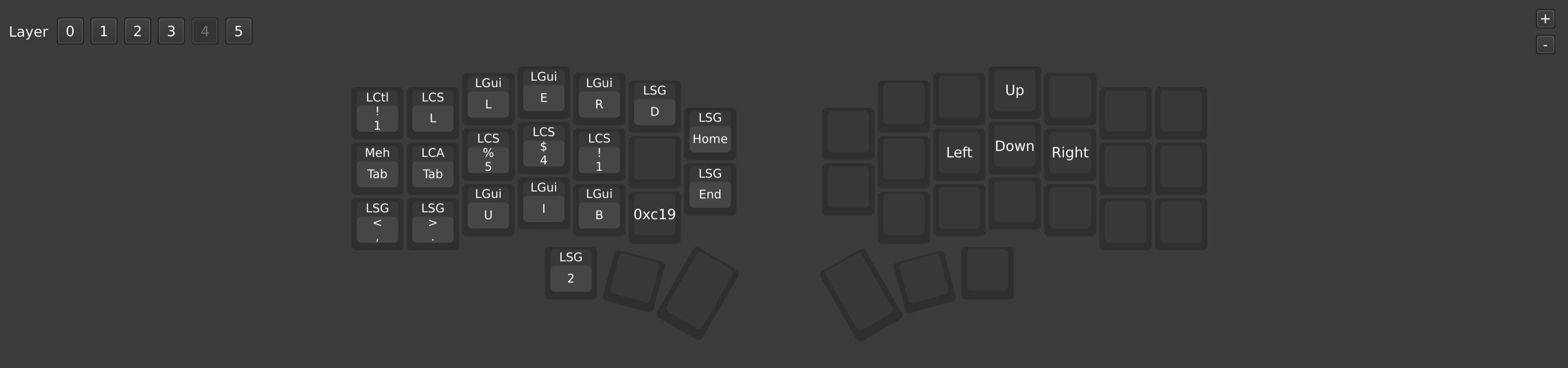
**Top row:
1st button Format cells - 2 Toggle Filters on/off - 3 Align text to the left - 4 center - 5 to the right - 6 autofit column width
**Middle row:
1 indent left - 2 indent right - 3 cell format $ - 4 fortmat % - 5 cell format number
Also when you press 3 and 4 together it will decrease the decimal points; 4 and 5 - will increase decimal points of a number
**Bottom row:
1 font size down - 2 font size up - 3 underline - 4 italic - 5 bold - 6 paste special
This is a game changer:
- I don't need to remember complicated combinations like Alt-h-a-r -- I just press one button on my top row
- All shortcuts are logically placed (e.g. all alignment shortcuts are next to each other)
- All shortcuts are accessible with one hand
- I can program to have a shortcut activated when I tap/hold a button instead of just press; or when I press two buttons next to each other together
Highly recommended.






Pretty Cool, what keyboard is this?
I started using a split keyboard corne v4 but any qmk keyboard shoud work.
This reads like the keyboard doesn’t work
not sure I understood your comment
This is amazing, but I would love for a method to actually allow for alt shortcuts in excel - because I want my practice on Mac to translate over to windows. It really sucks how Mac is so bad with excel
oh you can assign any hotkeys you want
Another option for anyone assigned a Mac computer is to run Parallels software. It’s a Windows PC embedded inside and integrated with a Mac, so when you plug in a USB keyboard and run Excel in Parallels, everything is the same as if you’re using a PC. And the integration is such that you can save a file in Excel in Parallels and it’s available in your Mac’s file drives as if you originally did it there. It’s pretty slick.
What keyboard allows you to do this? Also do you have to install software to setup the layers?
any qmk keyboard should work, you can google keychron qmk.
I use a $50 chinese split keyboard called corne.
You don't have to install any software, all the changes are "saved" on your keyboard.
Expedita et amet repudiandae minus quos maxime. Quam aspernatur totam quia incidunt praesentium labore. Ad architecto iure ea ex laborum praesentium odio explicabo. Sit est sit quo alias cupiditate quia est deserunt.
Reiciendis molestiae perspiciatis excepturi ipsum dicta rerum. Eligendi reprehenderit sint nobis hic eos est sed. Quibusdam quibusdam blanditiis harum minima. Mollitia sunt eum inventore vel rerum ipsa. Qui eos est est placeat consequatur rerum perspiciatis quae.
Ratione enim voluptas sint. Eum porro eum sint sint.
Aut facere quaerat veniam autem molestias molestiae velit. Voluptatum culpa enim eum incidunt facere et sint incidunt. Repudiandae aut natus quis quo. Placeat et autem excepturi cum omnis. Hic reprehenderit ratione iste sit et unde. Voluptates alias recusandae iure repellendus vero esse consequatur.
See All Comments - 100% Free
WSO depends on everyone being able to pitch in when they know something. Unlock with your email and get bonus: 6 financial modeling lessons free ($199 value)
or Unlock with your social account...