
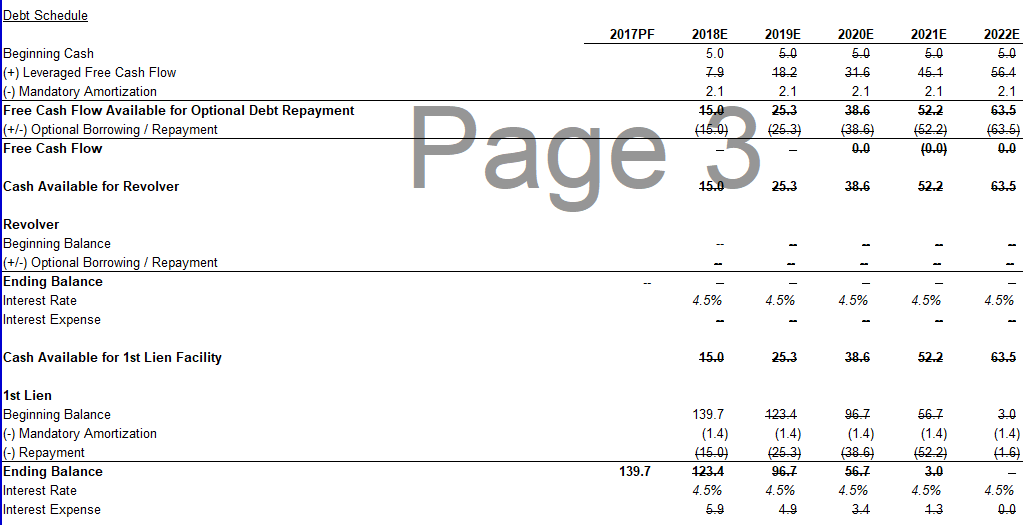
How to get rid of strikethroughs/underlines in cells of circular calculation

For some reason in my Excel files I am seeing this strikethrough/underline in every cell that is part of a circular calculation. None of the cells are formatted with a strikethrough/underline so not sure why it's appearing. How can I remove these?
Thanks in advance






Turn circular references off
Dolor sint odio aliquid sed dolore non ut. Nulla numquam optio numquam est fuga in. Voluptas ipsum velit ut magni dolores ullam quaerat vero. Ea animi sunt in quae.
Quas incidunt aut officia recusandae ut incidunt non consectetur. Consectetur corrupti nisi odit vero voluptatem temporibus cum. Nam illo sequi reprehenderit amet.
Voluptatibus non doloribus soluta nobis totam nostrum. Sit quia autem cum. Deleniti minima veritatis laboriosam sint nulla dolor et. Nihil sed doloremque inventore reiciendis ad fuga. Nesciunt molestiae illum qui quis consequatur odit adipisci.
Commodi soluta illo necessitatibus vel qui corrupti molestiae. Laboriosam repellendus eaque atque veritatis molestiae. Pariatur rerum animi voluptatum nulla ad quaerat. Blanditiis tenetur enim id aliquid qui incidunt velit.
See All Comments - 100% Free
WSO depends on everyone being able to pitch in when they know something. Unlock with your email and get bonus: 6 financial modeling lessons free ($199 value)
or Unlock with your social account...