


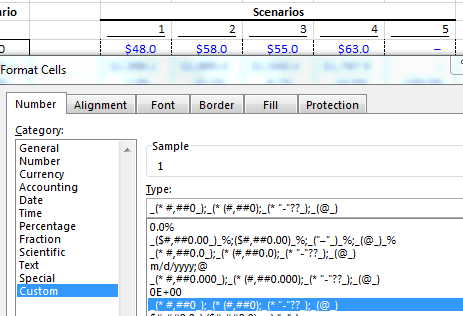
I’m trying to keep the full cell width underline while centering the number.
I know that the “* “ (asterisk + space) is what’s making it align right, but I’ve tried deleting and changing the formula a handful of different ways but can’t get it to let me center the number.
I have the Macabacus Add-In and thought the “Accounting Underline” would be what I’m looking for, but it isn’t doing what I expect/want.
*EDIT*
Excel is a mysterious creature... I put [="1"] on General format and used Macabacus Accounting Underline and then copy/paste values and it worked! It's not perfect/ideal because I had to add the [="#"] manually but it's a petty formatting preference that I don't plan on using much. I assume the obstacle is that the Macabacus underline doesn't work on numbers, just text.
| Attachment | Size |
|---|---|
| Underline Format.png 12.4 KB | 12.4 KB |
| Underline2.JPG 19.32 KB | 19.32 KB |
| Underline3.JPG 12.87 KB | 12.87 KB |








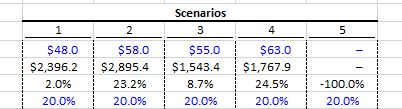

You could always use the bottom border of the cell and center your number, if you want spacing between the scenarios you add a very thin column between them (with no bottom border).
Border is one way but you could also just underline spaces around the number. More of a pain but really these are your only options.
^ That's what he's already doing - the "* " just means repeat the space up to the number, hence it's pushing everything to the right
You could also just draw a line under the stuff you want.
Underlining spaces entered in a thin row just below the row with the centered number (like a year figure for example, or date figure) is usually how I do it, if I'm understanding the OP correctly.
Using borders and then adding a thin column in between entries like Cruncharoo also works - but then that means you have to have entries in every other column, and this is not always ideal for things like year by year entries for say 3-statements worth of figures, DCFs, or whatever else requires multi-year entries of data. Reason being it can become a hassle, and you can just copy right quickly.
As for centering - I generally just delete the * and it works. You need to make sure to do it for the +ve numbers, -ves, and also the zeros which show up '-'
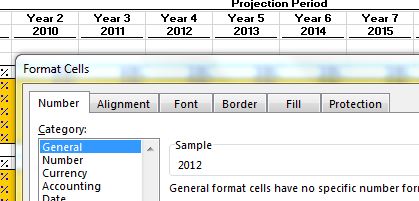
Adding an extra column is punishable by death in my book. I've received way too many project models built by engineers and business development guys who have done that and it makes me cringe. I'm doing a case study over the ongoing Mens Warehouse/Jos A Bank deal and it's a bit complicated with the "Pac-Man" offer and all. I attached another picture from a Rosenbaum & Pearl model showing what I'm aiming for as General format... Even when I use Format Painter from this model I can't recreate it on my merger model. I don't believe anything is impossible, so I'm going to keep at it.
Agreed. An extra column with nothing in it makes the sheet a shit to navigate.
centering it and then using accounting underline should make this work.
Single Accounting Underline?
So what's the final custom format? Or does Macabacus hide that part? Wouldn't mind stealing that for a few of my own projects :D
Trying to get the underlines like they do in Rosembaum's models formatting, anyone have any idea how to accomplish this (under years and texts)?
I think it looks pretty neat.
bump... I just don't understand how Rosenbaum and Pearl underlined the years without putting it in accounting format
In enim dignissimos quod neque. Ex voluptatum atque cumque voluptas vel. Nihil ipsa a deserunt. Temporibus omnis voluptas hic quas magnam.
Illo saepe architecto fuga. Facere velit ex laboriosam et beatae quia. Ipsa asperiores quas est fuga quam dolor optio. Dolorem quia magni vero voluptas voluptatem ipsam. Molestias nobis mollitia provident aspernatur. Debitis sit beatae expedita nulla. Et qui aut consequatur quisquam tenetur vero. Voluptas laboriosam quae occaecati quidem.
See All Comments - 100% Free
WSO depends on everyone being able to pitch in when they know something. Unlock with your email and get bonus: 6 financial modeling lessons free ($199 value)
or Unlock with your social account...